

In Australia, 20.2% of surveyed sites had no robots.txt file, while 41.5% used uniform rules and 32.8% used path-mixed rules. A robots.txt file is a plain text file at the root of a website that gives crawlers, especially Googlebot, simple Allow and Disallow rules telling them which pages they may fetch, and it controls crawling rather than indexing.
A Melbourne tradie might discover the file after a website rebuild, while a dentist may encounter it when a developer asks whether Google should crawl an appointment confirmation page. The file looks small and harmless, but one misplaced Disallow: / can stop search crawlers reaching almost everything on a live site.
Table of Contents
- What Robots.txt Is and What It Actually Controls
- The Core Directives Explained With Simple Examples
- Real-World Uses for Local Service Businesses
- Common Misunderstandings That Cause Real Damage
- Less Obvious Risks Worth Watching in 2026
- Testing and Maintaining Your Robots.txt With Confidence
What Robots.txt Is and What It Actually Controls
Robots.txt lives at the root of a website, such as ` It gives web crawlers instructions before they fetch URLs. A useful analogy is a polite sign at a building entrance: it tells visitors which rooms they may enter, but it doesn't install a lock on every door.
The important distinction is crawl control versus index control. Crawling means a bot requests and reads a URL. Indexing means a search engine decides whether that URL should appear in search results. Google explains that blocking a URL in robots.txt can prevent crawling, but it doesn't reliably prevent the URL from appearing in search results. For removal, Google recommends noindex, password protection, or removing the page entirely in its robots.txt documentation.
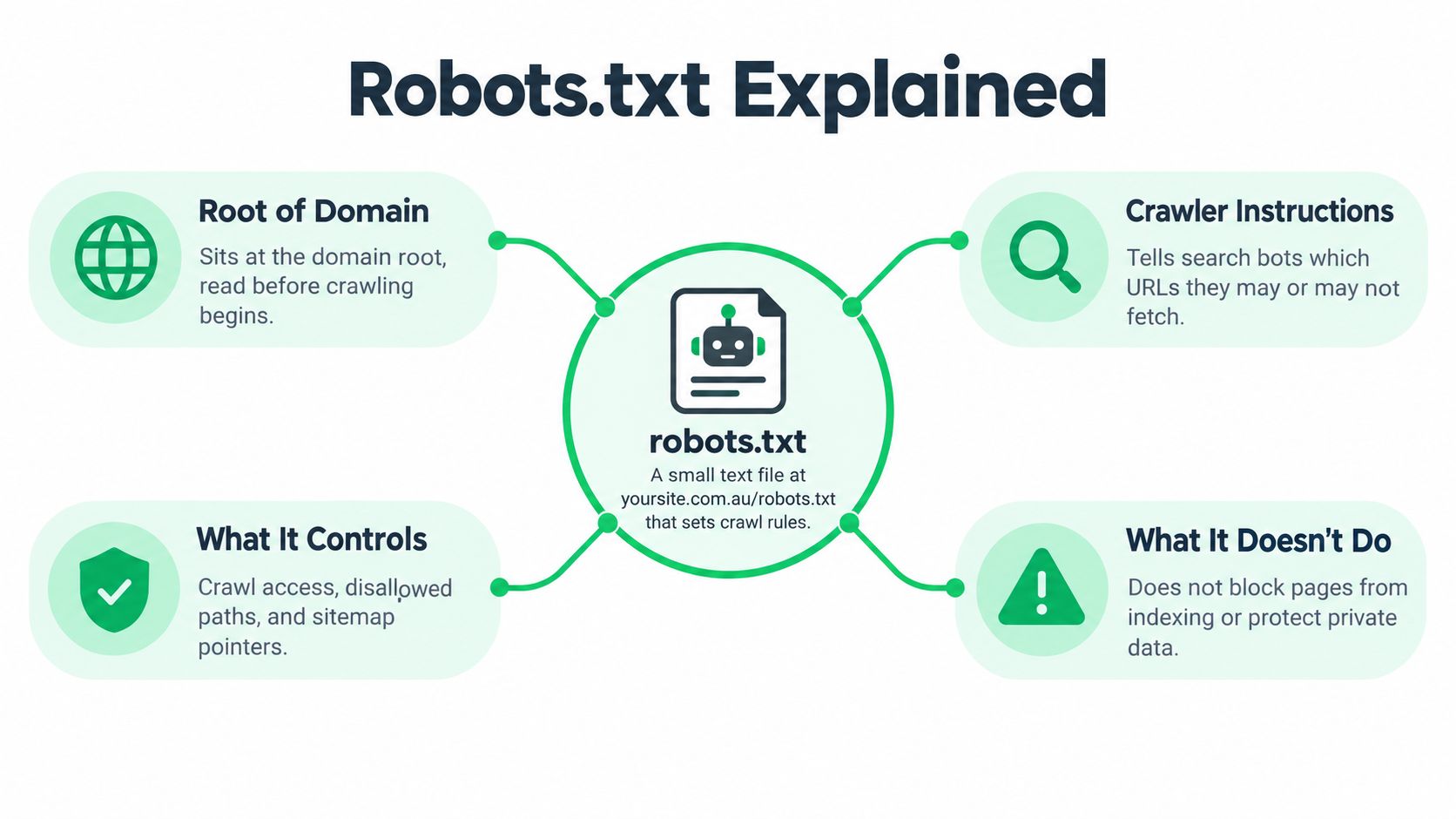
Where the file belongs
Google requires robots.txt to sit at the root of the relevant protocol and host, using the exact path /robots.txt. A copy at /blog/robots.txt won't control the whole domain. Google also says each port needs its own robots.txt file, and the file should be UTF-8 plain text with standard line breaks, as explained in its robots.txt technical requirements.
A site doesn't have to create a robots.txt file. If it doesn't exist, crawlers generally continue according to their other rules and technical limits. In Australia, the file remains a common crawl-management mechanism. A 2026 State of Web Access study covering 1,111 Australian sites found that AI crawlers were named by 16.0% of sites and SEO or search indexing bots by 11.8%, providing a useful benchmark for how Australian websites manage crawler access through this file (Australian benchmark).
Who follows it
Googlebot honours robots.txt instructions, as do many legitimate search, SEO and AI crawlers. A malicious scraper can ignore the file, however, so robots.txt isn't a security system and shouldn't be used to hide confidential information.
A helpful technical SEO overview of how search engines crawl websites places robots.txt in the wider discovery process. The file can reduce unnecessary requests to admin areas, filters and search results, but it can't protect customer records, unpublished documents or private business systems.
The Core Directives Explained With Simple Examples
A robots.txt file is made from groups. Each group begins with User-agent, followed by rules for that crawler. Directives go on separate lines, and paths are written from the domain root.
User-agent chooses the crawler
To apply a rule to all crawlers:
User-agent: *
The asterisk means “all user agents”. A business can target a particular crawler instead:
User-agent: Googlebot
Google says a more specific Googlebot group can override a broader group. Googlebot Smartphone and Googlebot Desktop use the same Googlebot product token, so robots.txt can't selectively target one of those two crawler types.
Disallow blocks fetching
To stop crawlers fetching a WordPress administration folder:
User-agent: *
Disallow: /wp-admin/
To block a single path:
Disallow: /thank-you/
That rule tells crawlers not to request the path. It does not guarantee that /thank-you/ will stay out of Google's index, particularly if other websites link to it.
An empty Disallow value means no path is blocked for that group. By contrast, Disallow: / blocks the entire site for that crawler group, which makes it dangerous on a live domain.
Allow can open a narrower path
A common pattern blocks a folder but leaves one useful file accessible:
User-agent: *
Disallow: /private-media/
Allow: /private-media/logo.svg
Search engines interpret the more specific path according to their documented rules. Because crawler support can vary, complicated exceptions should be tested rather than assumed.
Sitemap points crawlers to important URLs
A sitemap line can point crawlers to the site's XML sitemap:
Sitemap:
It doesn't grant or remove access. It gives crawlers a clear location for the site's preferred URL list. The XML sitemap guide covers the separate purpose of sitemap files.
A small staging example brings the directives together:
User-agent: *
Disallow: /staging/
Allow: /

Sitemap:
This keeps the live site available for crawling while discouraging crawlers from fetching URLs beneath /staging/. It won't protect the staging area from direct visitors, so authentication remains necessary if the content isn't public.
Real-World Uses for Local Service Businesses
A Melbourne plumbing business usually doesn't need an elaborate robots.txt file. It needs a short set of rules that keeps low-value technical URLs out of crawler request queues without blocking service pages that bring enquiries.
The business might use:
User-agent: *
Disallow: /wp-admin/
Disallow: /?s=
Disallow: /search
Disallow: /staging/

Sitemap:
The first rule covers the WordPress administration area. The search rules address internal search results, although the exact pattern depends on how the website creates search URLs. The staging rule is useful only if the staging path is on the same host. A staging subdomain has its own host and therefore needs its own robots.txt file.
Thin location pages require more judgement. If a plumber serves Melbourne but has automatically generated pages for Sydney, Brisbane and every suburb without real local service coverage, those pages can create quality and relevance problems. Robots.txt can prevent crawling of selected paths, but pages that should never exist publicly are better removed or redirected, while pages that need to remain accessible but shouldn't enter search can use noindex.
A dental clinic might block appointment-flow URLs, internal search results and administration paths. The clinic shouldn't block treatment pages, practitioner pages, location information or helpful aftercare content because those pages contain forms or JavaScript. Google states that when a URL is disallowed, Googlebot skips the HTTP request and doesn't render JavaScript on that URL, so blocking an important page can hide the resources and content needed to understand it.
An electrician rebuilding a site could keep /staging/ out of routine crawling while leaving live service, suburb and contact pages open. The reasoning matters more than copying a template. Crawl management should remove distractions such as duplicate filters and endless search URLs, not remove the business's most valuable content.
Common Misunderstandings That Cause Real Damage
A Melbourne dentist launches a new site and blocks /admin/ for sensible reasons. A week later, the same rule blocks /, and Googlebot cannot fetch any public page. That mistake exposes the first rule of robots.txt: it guides compliant crawlers, not people or attackers.
Anyone can enter a disallowed URL in a browser, and a malicious crawler can ignore the file. A New South Wales government robots.txt file demonstrates the legitimate use clearly: it helps prevent crawling and indexing of selected areas and can save bandwidth and server resources, while blocking archives, previews, taxonomy pages, administration paths and form URLs (NSW robots.txt example).
Robots.txt therefore manages crawl access. It does not provide confidentiality. Put private staging sites, customer portals and unpublished documents behind authentication. If a resource should not be public, restrict it at the server or remove it.
Blocking isn't de-indexing
A URL that Google already knows about can remain in search results after robots.txt blocks crawling. Google may have discovered it through an external link, a sitemap or another signal. The block stops Googlebot fetching the page, so Google may not be able to read its content or directives.
Choose the control that matches the job:
- Noindex: Add a
noindexrobots meta tag or anX-Robots-Tagresponse. Keep the URL crawlable so Google can read the instruction. - Password protection: Restrict access to private or unfinished content.
- Removal: Delete obsolete content and return an appropriate response. Add a relevant redirect when a suitable replacement exists.
- Canonical: Use
rel="canonical"when accessible URLs contain substantially the same content. A canonical is a preference, not a guaranteed removal command.
Google's Googlebot guidance separates crawl control from index control. Combining Disallow with noindex can fail because Googlebot may be unable to reach the page and read the tag.
The dangerous whole-site rule
A Melbourne plumber can accidentally publish this staging rule:
User-agent: *
Disallow: /
The sitemap might still open in a browser, but Googlebot cannot fetch the URLs listed in it. Remove the rule from the live file, confirm the correct version is served, then inspect representative URLs in Search Console and request indexing where appropriate.
A guide to checking a Google rankings drop covers other causes of lost visibility. A valid sitemap never overrides a robots.txt block.
Less Obvious Risks Worth Watching in 2026
A robots.txt file is small, but it behaves like operational infrastructure. Google says content beyond approximately 500 KiB can be ignored or truncated, so a file that has accumulated years of plugin-generated rules deserves review (Google's robots.txt creation guidance). Long lists of individual URLs are harder to maintain than carefully chosen path rules, and they increase the chance that a later edit blocks a valuable folder.
Availability matters as much as syntax. Google says a site isn't required to have robots.txt, but when the file is requested it should return a successful response. If it becomes unavailable, Google may pause crawling for up to 12 hours, then fall back to the last successfully fetched version for up to 30 days, according to Google's robots.txt availability guidance.
Deployment failures can change crawl behaviour
A developer can accidentally replace a valid file with an application error, redirect it through a login screen or serve HTML instead of plain text. A release can also overwrite carefully maintained rules with a CMS default. These failures don't always produce an obvious visual problem for a business owner, because the homepage still opens normally.
A monitoring process should check the live response after deployments, not merely the contents saved in a content management system. The operational question is whether crawlers can retrieve the correct file from the exact host and path.
Different bots have different priorities
User-agent groups can name Googlebot, Bingbot, Applebot, GPTBot, AhrefsBot and Meta crawlers separately, but instructions don't guarantee identical behaviour across every bot. Some crawlers may interpret directives differently, and malicious software may ignore them altogether.
Australian sites should therefore decide which legitimate crawlers matter to their objectives. A rule intended to reduce scraping shouldn't accidentally block a search crawler that supports discovery, and an AI-related rule should be checked against the specific crawler's published documentation rather than a generic bot list.
Geography can create crawl gaps
Locale-adaptive websites change content based on a visitor's location. Google says these sites must allow Googlebot to access the version it needs to see, because location-based blocking can prevent Google from reaching the Australian variant (Google's locale-adaptive page guidance).
A Sydney business serving Australian customers might use CDN rules, geo-routing or country folders. If edge security allows Australian users but treats Google's request as an unrecognised location, the crawler may receive the wrong page or no page at all. Robots.txt must be consistent across relevant locales, and server-side rules need separate testing. A correct file can't repair a location gate that blocks the HTTP request before Google reaches the page.
Testing and Maintaining Your Robots.txt With Confidence
A small business owner can test robots.txt without editing server configuration. The process should start with the live URL, not a file saved on a laptop.
Check the public file first
Open ` in a browser. Confirm that:
- The response loads from the root path.
- The content is plain text and readable.
- The live host serves the intended file.
- The page doesn't redirect to a login screen or unrelated URL.
- The file doesn't contain an accidental
Disallow: /.
Google recommends uploading the file to the site root and testing it after upload. A redirect may still look acceptable in a browser while causing crawler handling problems, so the web developer or hosting provider should confirm the response status when a redirect or server error appears.
Test important URLs
Google Search Console's robots.txt reporting and testing features can help compare rules against real URLs. The older robots.txt Tester may not be available in every property or account, so the current Search Console reports and URL Inspection tool should be used where the legacy tester isn't present.
A practical test set includes:
- The homepage.
- One important service page.
- One suburb or location page.
- A CSS or JavaScript resource if the site depends on it for visible content.
- A deliberately blocked admin, search or staging URL.
- The XML sitemap URL.
Each result should match the business's intention. A service page marked blocked is a problem even if the file looks tidy. A search URL marked allowed may indicate that the actual URL pattern differs from the assumed rule.
Use URL Inspection for crawl evidence
URL Inspection can show Google's known status for a representative URL and provide a way to request indexing for an eligible page. A blocked URL isn't a suitable candidate for an indexing request, but it can still be inspected to understand the reported block and confirm that the rule is the reason Google can't fetch it.
Practical rule: Test a real URL copied from the sitemap, not a guessed version. Query parameters, capitalisation and trailing slashes can change which path a rule matches.
Keep change control simple
Robots.txt should have an owner. A dated backup or repository makes it possible to compare versions after a WordPress update, theme change, plugin installation or website migration. A basic spreadsheet can record the date, person making the change, reason for the change and URLs tested afterwards.
The monthly check can remain short:
- Confirm the file is below the documented size ceiling.
- Check for wildcard rules that match more URLs than intended.
- Search for an accidental whole-site
Disallow: /. - Confirm the sitemap line points to the current canonical sitemap URL.
- Review Search Console's blocked-by-robots findings.
- Recheck a service page, contact page and important location page.
The technical SEO checklist for small businesses includes robots.txt alongside other crawl and rendering checks. For a site that changes rarely, the review can be tied to releases and hosting changes rather than treated as a daily task.
A trustworthy robots.txt file isn't the longest or most complex one. It's a small, documented set of rules that the business can explain, test and safely change.
SEO2RANK helps Melbourne service businesses audit crawl and indexing barriers, check robots.txt against important pages, and connect technical findings with Search Console and enquiry data. Visit SEO2RANK to arrange a plain-English review if a rebuild, migration or unexplained visibility change has made the file difficult to trust.
Find Out What Is Holding Your
Website Back
Get a practical SEO Snapshot showing the biggest issues and opportunities we can see across your search visibility, website and local presence.
GET YOUR FREE SEO SNAPSHOT