
You're usually looking at two different jobs on the same page. The SEO title is the label search engines show in results and browser tabs, while the H1 heading is the main visible heading on the page itself. They should stay on the same topic, but they don't need to be identical, and in many Australian service pages they work better when they're written separately so the title can win the click and the H1 can help the reader feel they're in the right place.
| Attribute | SEO Title, title tag | H1 Heading |
|---|---|---|
| Where it appears | Browser tabs, search results, shared links | The page itself, usually at the top |
| Main job | Help the page get found and earn the click | Confirm the page topic for the visitor |
| Usual length guidance | Keep it concise, often around under 60 characters in AU guidance, with APS guidance allowing up to 70 characters | No fixed character cap, but it should still stay clear and readable |
| Google uses it as the SERP link | Yes, though Google can rewrite it from other signals | Not usually, but it can influence the displayed title link |
| Must be unique per page | Yes | Yes, in practice, one main H1 per page |
| Appears off-site | Yes | No |
A lot of confusion comes from treating these two elements like the same thing with different names. They're not. The title tag is for discovery, the H1 is for on-page clarity, and those jobs overlap only enough to support each other, not enough to be copy-pasted every time.
Practical rule: if the page is a service page, the title can lean harder into search terms, while the H1 can sound a bit more natural for a person who just landed on the page.
Table of Contents
- The Short Answer on SEO Titles and H1 Headings
- What Each Element Actually Does
- How SEO Titles and H1s Compare in Practice
- Real-World Scenarios for Service and Location Pages
- Implementation Tips for Common Australian CMSs
- When Google Rewrites Your Title Anyway
- A Quick Pre-Publish Checklist for Every Page
The Short Answer on SEO Titles and H1 Headings
Use a unique SEO title for search and a separate H1 heading for the page itself. On service and location pages, that split matters because Google often rewrites the title tag, especially when it thinks a different wording will suit the searcher better. If you want control over the result, the title needs to be clear, unique, and close to what people search for. The H1 needs to sound right on the page.
An Adelaide plumber is a good example. The title might include the suburb and service terms so the page has a better shot at the right query. The H1 can still read more naturally, which helps once the visitor lands and starts scanning. That trade-off is normal. In practice, a title written only for search can feel awkward on the page, while an H1 written only for the page can miss useful search wording.
The main rule is uniqueness. A page title should stand apart from the rest of the site, and the H1 should mark one clear topic on the page itself. The guidance cited above also supports concise, readable titles and a single main heading. Google's heading guidance keeps the title element and the visible heading separate for page presentation (Google heading guidance). That separation is helpful because it gives you room to write for two different jobs without forcing the same sentence to do both.
For a tradie or practice owner, the practical edit is simple. Keep the title useful for the search result and the browser tab. Keep the H1 useful for the person who has just clicked through. If the same wording works for both, fine. If it does not, give each element its own job.
One rule rarely bends, especially on local pages. The title should stay unique, and the H1 should stay singular and obvious on the page. That gives you a cleaner structure and reduces the chance that a recycled heading makes the page feel generic before the body copy has a chance to do its work.
What Each Element Actually Does
The title tag works before the click
The title tag is the part Google reads as a page label, and it's also the line people see in search results, browser tabs, and often when a page is shared. Google's heading guidance keeps the title element and visible heading separate for a reason, because they serve different presentation jobs (Google heading guidance). In practical terms, the title is the discovery and click layer.
That's why title writing is usually a little tighter than H1 writing. It needs to tell a searcher what the page is about fast, without wasting space on filler. Australian guidance from APS Professions recommends keeping titles between 6 and 9 words and under 70 characters, and Queensland government guidance gives a stricter practical milestone of under 60 characters (APS Professions on-page SEO, Queensland guidance).
The H1 works after the click
The H1 helps the visitor confirm they've landed on the right page. On a service page, that matters because people skim first and read later. If the H1 is vague, buried, or duplicated across multiple pages, the page feels less trustworthy before the body copy even gets a chance to do its job.
The Australian National University guide says each page should contain only one H1, with H2s and H3s used for the hierarchy underneath it (ANU web style guide on headings). Australian Government guidance says the same thing in principle, one level 1 heading per page, unique to that webpage, which reinforces the idea that the H1 is the page's visible topical anchor rather than a search snippet field.
Accessibility is the other reason H1s matter. Screen reader users rely on headings to move through content efficiently, so a clear H1 improves navigation for real people, not just search engines. That's one reason a page with no obvious H1 usually feels unfinished.
A title tag can win attention in Google. An H1 can win trust on the page.
For a plain-English glossary of related SEO terms, this SEO glossary can help without muddying the distinction between the two elements.
How SEO Titles and H1s Compare in Practice
A useful rule is this, the SEO title earns the click, and the H1 confirms the page once it loads. That split matters on Australian service and location pages, because Google may rewrite the title tag if it thinks another wording matches the query better. If your title is already doing too many jobs, the rewrite risk goes up.
A good setup gives each element a different job. The title tag can stay tight, front-load the service or location, and still leave room for the brand. The H1 can sound more natural and explain the page in plain language. Identical wording is acceptable if the page is short and the phrase reads cleanly in both places, but it is usually a poor fit once you need to include suburb, service type, and brand in a single line.
That is where page type matters. A location page for a plumber, dentist, or accountant often needs the title to be compact enough for search results, while the H1 can carry the visitor-facing wording that feels less cramped. If both lines are forced to match exactly, the page can end up repetitive instead of clear. That is a common problem on Australian service sites, especially where the title tag gets rewritten and the H1 is the only line the visitor sees unchanged.
The H1 should still be present and obvious on content pages. A page without one usually feels unfinished and is harder to scan, even if the template technically allows it. The page also loses a clear topical anchor. Australian style guidance keeps pushing toward a single visible H1 for that reason, because it gives the page one main heading and keeps the hierarchy readable.
For practice owners, the decision is simple. Do not ask whether the title and H1 must match word-for-word. Ask whether each one is doing its own job without clutter. A strong title invites the click. A strong H1 confirms the promise after the click.
Real-World Scenarios for Service and Location Pages
A Melbourne plumber's service page often needs a title like Blocked Drain Cleaning in Brunswick | Brand Name and an H1 like Blocked Drain Cleaning for Homes and Businesses in Brunswick. The title leads with the service and suburb because that's what searchers scan for in results. The H1 can then read a bit more like a promise to the visitor, which helps the page feel more human once it loads.
A dentist's location page often works best when the title keeps the clinic name tidy at the end, while the H1 focuses on the service and place. For a practice owner, that matters because location pages usually need to do double duty, they need to show relevance to the suburb and still read like a real page rather than a string of keywords. Local SEO guidance from SEO2RANK's local SEO resource fits that pattern well because location relevance is part of the page's purpose, not an afterthought.
An accountant's suburbs-we-serve page is a slightly different beast. The title might name the core service and the broader area, while the H1 can frame the page around service coverage rather than a single postcode. That keeps the page useful for people comparing nearby options and avoids the stale feel of stuffing every suburb into one line.
A tradie's homepage usually has the most pressure on it, because it's both a brand page and a lead page. The title often needs to say what the business does, and the H1 often needs to reassure the visitor that they're in the right place fast. If the wording is exactly the same on both, it can feel repetitive. If the wording is too different, it can feel disconnected.
| Page Type | Title Tag, ≤60 chars | H1 Heading | Why It Works |
|---|---|---|---|
| Plumber service page | Blocked Drain Cleaning Brunswick | Blocked Drain Cleaning for Brunswick Homes | Search-friendly title, clear on-page promise |
| Dentist location page | Dentist in Richmond | Richmond Dental Care for Families | Location signal stays clear without sounding forced |
| Accountant suburbs page | Tax Accountant Eastern Suburbs | Accounting Support Across the Eastern Suburbs | Broader coverage fits the page's purpose |
| Tradie homepage | Electrician Melbourne | Reliable Electrical Services Across Melbourne | Brand and service are easy to understand quickly |
The common thread is balance. The title helps the page show up and get clicked. The H1 helps the page feel immediately relevant when the visitor lands. Exact matching can strengthen topical focus in some cases, but on local pages it often hurts the click if the result looks repetitive or overstuffed.
Implementation Tips for Common Australian CMSs
WordPress
In WordPress, the SEO plugin field usually controls the title tag, while the page editor controls the visible H1. Yoast and Rank Math both make that split fairly clear, which is useful because the on-screen page title isn't always what Google uses for the search result. The common mistake is editing only the content heading and assuming the browser tab and snippet will follow automatically.
That separation is where a lot of pages drift. The plugin title can be search-ready, while the H1 can stay more natural for readers. For site owners using WordPress, that's often the simplest way to avoid awkward duplication.
Squarespace
Squarespace tends to blur the line a bit more because the page title settings can feed multiple displays unless they're deliberately overridden. That makes it easy to think one edit has fixed everything, when the visible heading on the page may still need a separate check. The safest habit is to treat the SEO field and the page heading as related, but not interchangeable.
Wix
Wix stores SEO settings and page headings in separate places, so the title tag and H1 need to be checked independently. That's useful for local businesses because it lets the snippet stay concise while the on-page heading stays clear. The usual mistake is leaving the heading field too generic after writing a strong title tag.
Shopify
Shopify can create clashes between collection titles, product titles, and page-level SEO settings, especially when different templates are in play. The title tag may be inherited from one field while the H1 comes from another, which is why a quick render check matters. On service pages built in Shopify, the page title should still read like a page title, not just a copied menu label.
For teams planning broader site changes, SEO2RANK's technical SEO resource is useful because title and heading issues often sit alongside template and indexing problems.
When Google Rewrites Your Title Anyway
Google doesn't always show the exact title tag that's been written. Its title-link guidance explains that the search result can be rewritten from signals such as the H1, prominent page text, or anchor text when the title looks weak, stuffed, or off-topic (Google title-link guidance). That matters a lot on Australian service pages, because a title that looks fine in the CMS can still be replaced in the SERP if the page sends mixed signals.
A common rewrite appears when the same suburb is repeated too many times across the title, H1, and opening paragraph. The fix isn't to repeat the suburb again, it's to tighten the title and make the body copy support the same intent cleanly. Another common rewrite shows up on location pages with thin copy, where Google seems to borrow a more useful phrase from the H1 or first paragraph. In that case, the corrective move is usually to add supporting copy that describes the service area and what the business does there.
A third pattern is the off-topic title. If the title says one thing and the page body spends its first screen on something else, Google has every reason to look elsewhere for a better label. The page can still rank, but the displayed title becomes less predictable.
The best defence against title rewriting is boring consistency. Lead with the real topic, keep the title concise, and make sure the H1 and first paragraph back it up.
For Australian sites, the habits that reduce override risk are straightforward. Keep the title front-loaded with intent, keep it around the practical length guidance already covered, and make sure the first visible heading doesn't fight the title. That doesn't guarantee Google will keep it unchanged, but it gives the algorithm less reason to substitute something else.
SEO2RANK's keyword research resource is relevant here because the title and H1 both work better when they're based on the phrases real customers use.
A Quick Pre-Publish Checklist for Every Page
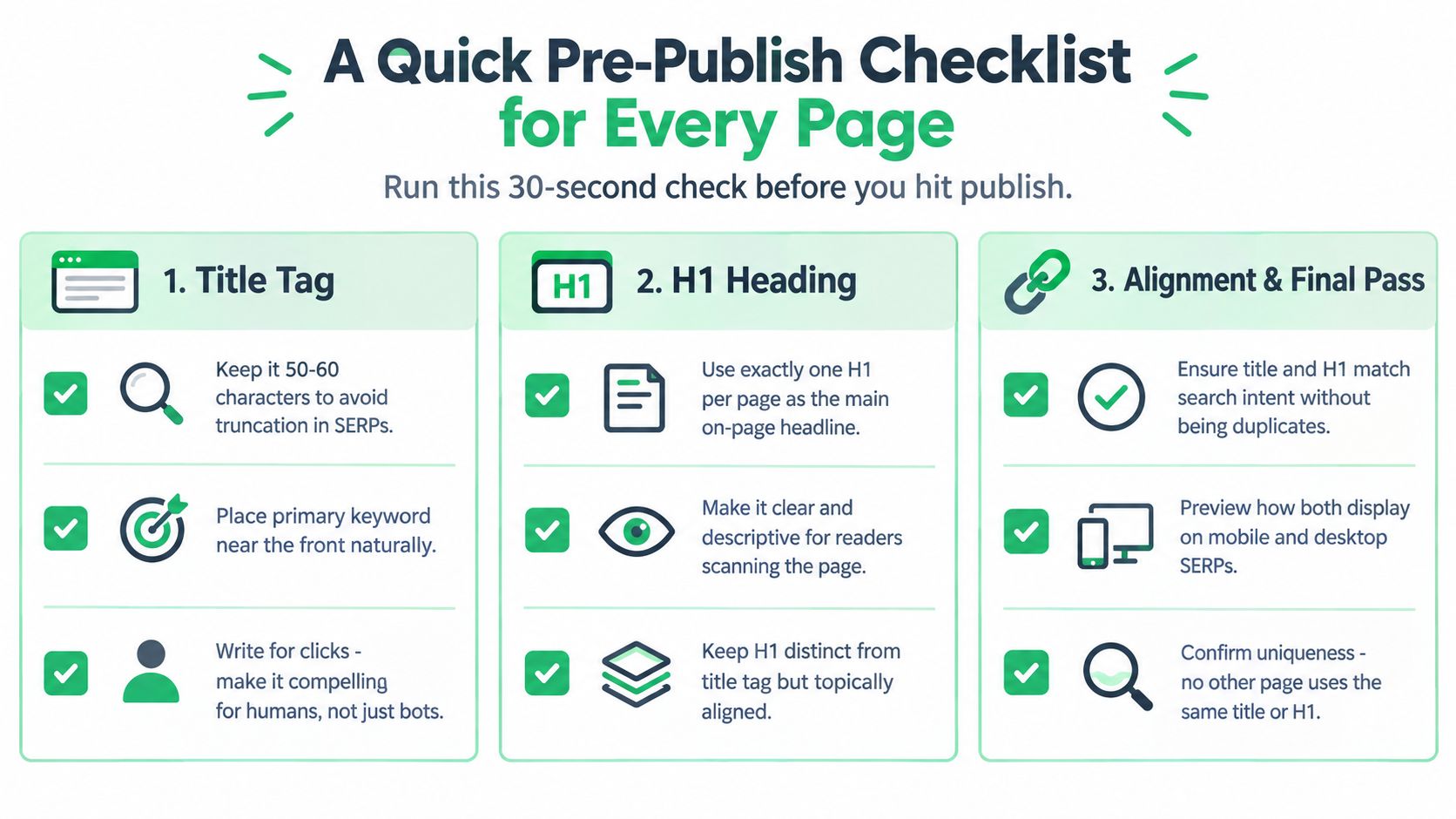
Title Tag
- Keep it concise: Aim for a title that reads cleanly in search and doesn't get bloated with filler.
- Put the main topic early: Lead with the service or page purpose so the searcher can tell quickly what the page is about.
- Make it unique: No two important pages should wear the same title, especially on a local business site.
H1
- Use one main H1: Give the page a single clear top-level heading so the structure is obvious.
- Write for the reader: Make the heading feel natural on the page, not like a stitched-together keyword list.
- Keep it aligned, not copied: The H1 should echo the same intent as the title without repeating it word-for-word unless that reads best.
Relationship Between Them
- Match search intent: The title and H1 should point to the same service, suburb, or offer.
- Avoid duplication across the site: Similar pages need distinct titles and distinct H1s, not near-clones.
- Check the rendered result: Look at the page in the browser, then test the snippet with a site: search and Google Search Console if it's available.
For broader content planning, SEO2RANK's keyword research guide can help shape the language before a page goes live.
Perfect title-to-H1 parity isn't the goal. Clarity is the goal, first for the person searching, then for the person reading the page. If the title helps the right visitor click and the H1 confirms they're in the right place, the page is doing its job.
If your titles and H1s are getting messy across service pages, location pages, or a site refresh, SEO2RANK can review the structure and tighten the on-page setup as part of a wider SEO program. Visit SEO2RANK to see how Melbourne businesses approach local, technical, and on-page SEO with clearer page structure and better lead-focused execution.
Find Out What Is Holding Your
Website Back
Get a practical SEO Snapshot showing the biggest issues and opportunities we can see across your search visibility, website and local presence.
GET YOUR FREE SEO SNAPSHOT