
Publishing more blog posts isn't the first fix for poor Google rankings. A business improves its website ranking by making important pages accessible to Google, matching those pages to relevant searches, maintaining accurate local business information and measuring enquiries alongside visibility. The practical order is access first, relevance second, conversion third, because better copy won't help a blocked page, and more clicks won't help a broken enquiry form.
Table of Contents
- Diagnose What Is Holding Your Rankings Back
- Clear the Technical Barriers Google Hits
- Rework Service Pages Around Real Searches
- Win Local Searches on Google Maps and Near Me
- Costs, Timelines and When to Get Help
- Measure Enquiries and Start Your 90-Day Plan
Diagnose What Is Holding Your Rankings Back
A ranking problem needs a diagnosis before it needs a content calendar. Google Search Console can show whether Google has indexed a service page, which searches trigger its appearance and whether those appearances generate clicks. Analytics and enquiry records then show whether those visitors become customers.
A website remains a meaningful business asset. In the Australian Bureau of Statistics' 2021–22 business figures, 67.2% of Australian businesses had some form of online presence, while 50.7% had their own website or app. For a Melbourne service business, the opportunity isn't just having a website, but making it useful enough to support discovery and customer decisions.
Match the symptom to the first fix
The following table gives working hypotheses, not definitive diagnoses. A missing page might be blocked, but it might also be a duplicate or a page Google hasn't chosen to index.
Ranking symptoms, likely causes and first fixes
| What You See | Likely Cause | Where to Check | First Fix |
|---|---|---|---|
| Key pages missing from Google results | Blocked, noindexed or left out of the sitemap | Search Console URL Inspection | Remove the block and resubmit the sitemap |
| Impressions but almost no clicks | Weak title and description, or the page does not match the search intent | Search Console Performance report by query | Rewrite the title and opening so they match the query |
| Ranking on page 2 or 3 | Thin content or weak internal links | Performance report filtered by query | Expand the answer and link to it from related pages |
| Clicks but no calls or forms | No clear next step or proof on the page | Analytics conversion events | Add service detail, proof and a visible contact path |
| Missing from Google Maps searches | Incomplete or inconsistent Google Business Profile | Google Business Profile insights | Complete the profile and match business details across the web |
| Slow or unstable on phones | Heavy images, scripts or third-party tools | Search Console Core Web Vitals report and PageSpeed Insights field data | Compress images and defer non-essential scripts |
Start with URL Inspection for commercially important pages. Check the indexing status, selected canonical URL and last crawl information before changing headings or adding keywords.
For pages receiving impressions, filter the Performance report by page, then inspect its queries. Low click-through rate needs context: a page appearing for loosely related searches has a different problem from a relevant page appearing prominently but attracting few clicks.
Diagnostic rule: Impressions show an opportunity to investigate. They don't prove that the page deserves more traffic or that its title is the only problem.
Read queries as customer problems
Say a Melbourne plumber's emergency page earns impressions for hot water repair but almost no clicks. Its title describes the company broadly, while the opening discusses general plumbing rather than hot water faults. The first useful change is to clarify the job the page covers, provided the business offers that service.
When clicks arrive without enquiries, inspect the landing page and test its contact options. A missed conversion event can resemble a failed page, so measurement needs checking too.
An abrupt decline needs a different investigation from a site that has never gained visibility. The checks for a Google rankings drop help separate recent changes from longstanding weaknesses.
Set a baseline by exporting 90 days of query and page data as a working review period. Match landing pages against enquiry records, then list the pages earning impressions without qualified enquiries.
Clear the Technical Barriers Google Hits
Technical work starts with access, not a speed score. Before commissioning new copy, confirm that Google can reach the intended page and understand which URL should appear in search.
Check access and site structure
- Inspect important URLs. Confirm that each page returns a normal successful response and isn't behind a login. Check for accidental
noindexinstructions and robots.txt restrictions. A robots.txt block and a noindex instruction aren't interchangeable, so identify the actual restriction before removing anything. - Review the XML sitemap. Include canonical, indexable URLs intended for search. Remove broken pages, redirected URLs and pages deliberately excluded from indexing.
- Clean up conflicting paths. Repair broken internal links and redirect chains. Check canonical tags on duplicate URLs, especially where filters, tracking parameters or platform settings create alternate versions.
- Make services easy to reach. Important service pages need clear navigation and contextual internal links. A sitemap isn't a substitute for a usable website structure.
- Validate business markup. Add appropriate LocalBusiness structured data using accurate business details, then test the implementation.
Google's LocalBusiness structured-data documentation recommends validation with the Rich Results Test and inspection through URL Inspection. Structured data helps interpretation and eligibility; it doesn't guarantee a ranking increase.
SEO 2 RANK's Technical SEO service covers crawlability and indexation, website architecture, canonicalisation, redirects and broken links, XML sitemap review, schema markup and core technical SEO issues. For owners handling implementation internally, the technical SEO checklist for small business provides a practical checking sequence.
Improve mobile performance without damaging the page
Real-user performance matters more than an isolated desktop test. In its historical Australia/New Zealand mobile study, Google's mobile research reported average mobile loading of about nine seconds, with 53% of mobile visits likely to be abandoned when loading exceeded three seconds. Those findings aren't a current benchmark for every Melbourne website, but they explain why slow mobile journeys deserve attention.
Google's Core Web Vitals guidance sets good-performance targets of LCP at 2.5 seconds or less, INP below 200 milliseconds and CLS below 0.1, assessed at the 75th percentile of visits.
Core Web Vitals thresholds and common fixes
| Metric | What It Measures | Good Threshold | Common Fix |
|---|---|---|---|
| Largest Contentful Paint (LCP) | How quickly the main content loads | 2.5 seconds or less | Compress hero images and improve hosting response and caching |
| Interaction to Next Paint (INP) | How quickly the page responds to taps and clicks | Below 200 milliseconds | Reduce heavy scripts and slow third-party tools |
| Cumulative Layout Shift (CLS) | How much content moves while loading | Below 0.1 | Set image dimensions and reserve space for embeds and banners |
Resize oversized hero images, use modern image formats and lazy-load below-the-fold media rather than the main image. Review chat widgets, booking systems and other third-party scripts before removing useful page content.
A perfect lab score isn't the objective. Test on Australian mobile connections, preserve redirects when changing URLs, and compare field performance with completed enquiries. Fast pages still need relevant services and credible information.
Rework Service Pages Around Real Searches
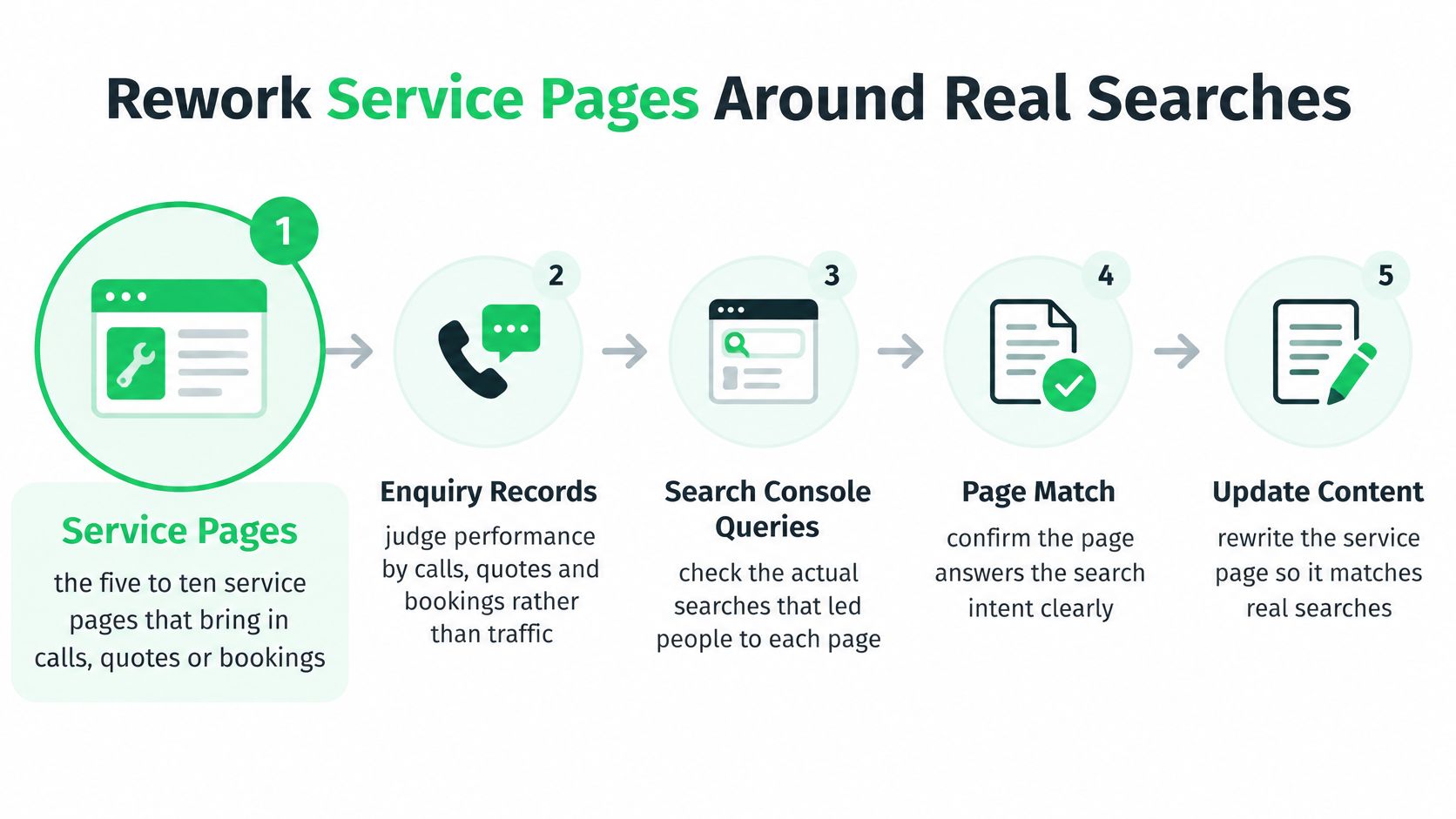
Begin with a manageable shortlist of service pages already producing calls, quote requests or bookings. Enquiry records should determine that shortlist, not traffic alone: a popular advice page may contribute less immediate revenue than a modestly visited commercial page.
For each selected page, inspect Search Console queries and compare them with the page's promise. A pricing query calls for cost context and exclusions; an urgent-repair query calls for service availability, practical boundaries and an obvious contact option.
Make each page useful before making it longer
Google's people-first content guidance prioritises helpful, reliable information and describes experience, expertise, authoritativeness and trustworthiness, commonly shortened to E-E-A-T. Google also states that its helpful-content system became part of its core ranking systems in March 2024. Repeating service keywords isn't a substitute for demonstrating knowledge and answering the customer's problem.
A practical rework follows this sequence:
- Clarify the title and opening. State the actual service, relevant area and customer outcome near the beginning. Avoid leading with a generic company slogan that could describe any competitor.
- Answer the immediate question. Explain what the service covers before adding background. Include the job process, scheduling considerations, cost drivers and complications where they help someone decide.
- Use customer questions as headings. Calls and emails often reveal better headings than keyword variations. Questions about eligibility, preparation, access and exclusions deserve straightforward answers.
- Identify the responsible practitioner. Name the owner or clinician where relevant, explain qualifications accurately and provide verifiable credentials. Project photographs and service examples should be genuine and used with appropriate permission.
- Strengthen internal links. Connect relevant guides to the service page using descriptive wording. Important commercial pages should also be easy to reach from the homepage.
- Repair the enquiry journey. Put a usable phone option and concise form near the main service explanation. Test both on a phone, including submission confirmation and delivery to the correct inbox.
- Record the changes. Keep a dated log of content, title, link and form edits. Compare performance after Google has had time to recrawl the page and enough enquiries have accumulated to make the comparison useful.
The guide to finding keywords customers actually search helps turn query patterns into page priorities. Keyword selection should guide the answer, not dictate awkward sentences.
A hot water repair example
Consider a plumber's hot water repair page that mainly repeats broad claims about being a leading Melbourne plumber. A more useful version explains common fault symptoms, safe checks a homeowner can make, situations requiring a qualified tradesperson and which systems the business services.
The page can also clarify callout arrangements, replacement considerations and factors affecting the quote. It shouldn't promise availability or response times the business can't reliably provide, or encourage unsafe electrical or gas work.
A stronger service page helps a customer make a decision. Adding words without improving that decision is just a longer page.
SEO 2 RANK's Build Relevance step improves local service content, location pages, internal links, structured data and supporting website content. The important distinction is implementation: a copy rewrite alone won't resolve an inaccessible page or an unusable form.
Near-duplicate suburb pages deserve particular caution. Changing a place name without adding meaningful service information creates little value, while fabricated reviews or qualifications undermine the trust the page needs to establish.
Win Local Searches on Google Maps and Near Me
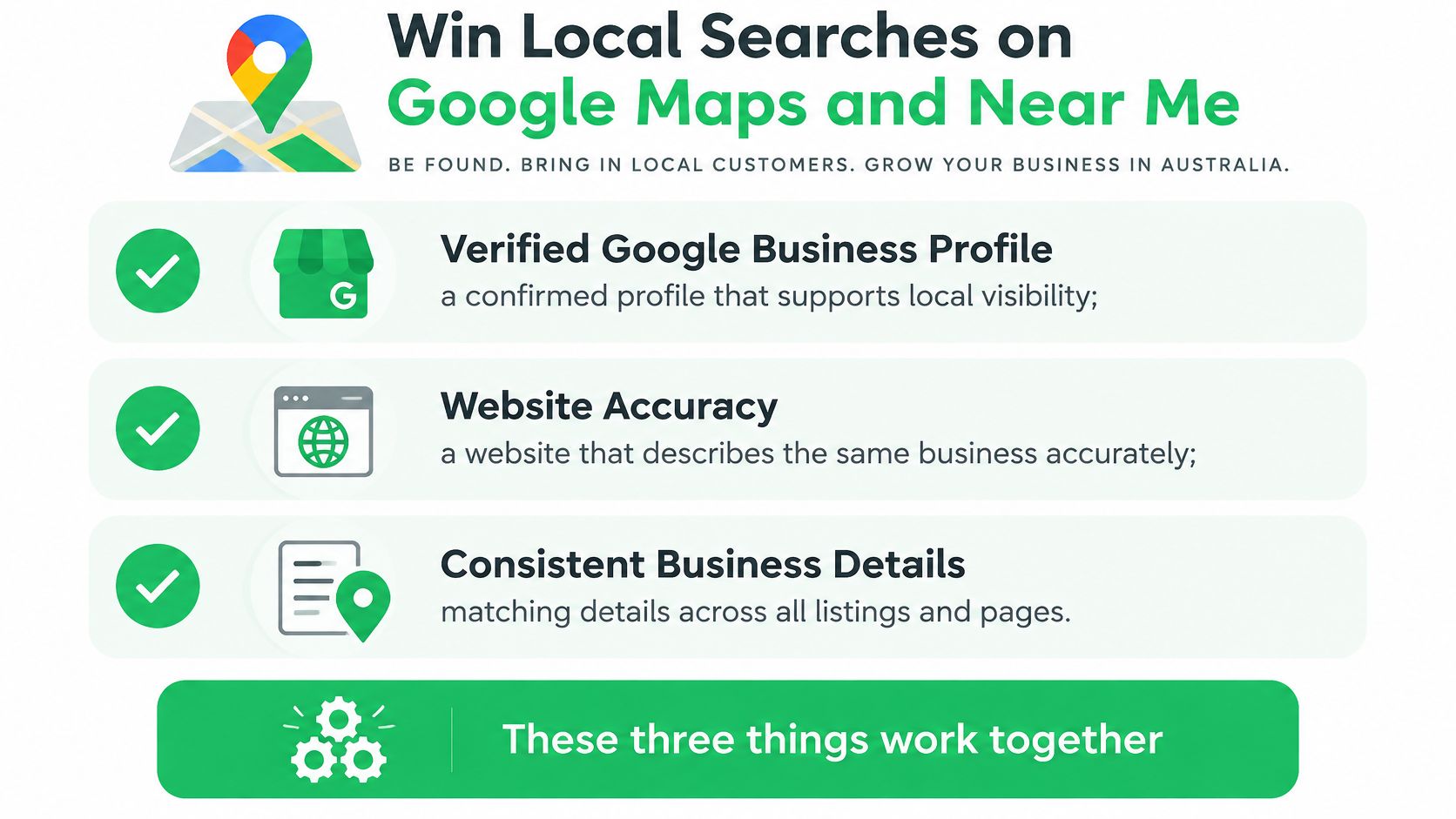
A common listing mistake is treating Google Business Profile as separate from the website. Local visibility needs a verified profile, an accurate website and consistent details across trusted directories, all describing the same real business.
Google's business-details guidance explains that claiming and verifying a profile enables owners to manage details such as contact information, business type and photos across Search and Maps. Website structured data adds clarity, but it doesn't replace an accurate profile.
Compare the listing with the real business
Local profile elements to get right
| Profile Element | What to Get Right | Common Mistake |
|---|---|---|
| Business name | The real trading name as customers know it | Keywords added to the name |
| Address or service area | Matches real premises or actual areas served | Fake locations or a PO box shown as a street address |
| Phone, hours and services | Identical on the profile, website and directories | Different numbers or hours across listings |
| Reviews | Requested from real customers and answered promptly | Purchased or incentivised reviews, or none answered |
Local demand deserves attention before a business commits to broad informational publishing. Red Search's Australian local SEO statistics roundup reports that 93% of Australians search online for local brands. That doesn't predict an individual business's results, but it supports prioritising commercially relevant local searches.
Profile completion alone isn't a ranking guarantee. Local SEO combines profile accuracy with website relevance and useful information about the locations customers search in.
Audit the local search journey
- Export the evidence. Review Google Business Profile performance alongside Search Console queries, grouping terms by service, suburb and urgency.
- Map genuine demand. Create or improve a landing page for each meaningful service-area opportunity only where the business can provide distinct, useful information.
- Reconcile business details. Check the name, address or service area, phone number, opening hours and service list across the profile, website and trusted Australian directories.
- Add local proof. Include relevant completed jobs, practitioner credentials, access constraints and service boundaries. Avoid implying a staffed office exists where there isn't one.
- Request genuine feedback. Invite customers to describe their experience naturally, without incentives or scripted keywords. Reply to every review without exposing private customer information.
SEO 2 RANK's Fix the Foundations step corrects profile, website, citation and technical issues that can limit visibility or create confusing business signals. A citation is a business mention or listing, so correcting an old directory phone number can be more useful than creating another weak suburb page.
The Melbourne local SEO checklist offers additional checks for owners reviewing their coverage. Avoid keyword-stuffed names, bought reviews and copied location pages rather than treating them as shortcuts.
Costs, Timelines and When to Get Help
SEO costs depend on the work required, not only the size of a keyword list. A small service website with editable templates presents a different workload from a multi-location business with inconsistent listings and a platform that needs developer intervention.
The main cost drivers are practical:
- Coverage. More distinct services and locations mean more pages to assess, maintain and substantiate.
- Content condition. Accurate existing copy may need refinement; unsupported claims and missing service information require deeper work.
- Platform access. Restricted templates, hosting limitations and third-party booking systems can make changes harder.
- Internal capacity. Owners can complete many checks themselves, but collecting credentials, approving copy and testing changes still takes time.
Match help to the risk
A small single-site business can often handle profile corrections, straightforward content updates and enquiry testing internally. Professional assistance becomes more appropriate for Search Console manual actions or security warnings, migrations, redesigns, complex multi-location setups and persistent indexing problems.
Developer involvement is especially useful when a fix affects shared templates, JavaScript rendering or redirects. The cheapest implementation isn't necessarily the safest if an error affects every service page.
Scope matters more than a ranking promise: A useful engagement identifies the changes, responsibility for implementation and the evidence used to judge progress.
SEO 2 RANK prioritises work according to the business's current position, competition and commercial opportunity, with a focus on changes that get implemented. Any proposed engagement still needs a written scope covering deliverables, access requirements, reporting and exclusions.
There's no universal completion date for ranking improvement. Changes need implementation, recrawling and evaluation, while competitors continue updating their own sites. Costs vary widely, so this article doesn't quote prices or imply that a particular budget buys a position.
Measure Enquiries and Start Your 90-Day Plan
The useful scorecard combines visibility, qualified traffic and enquiries. Rankings help explain discovery, but they don't show whether a caller needs the service, falls within the service area or becomes a booked job.
Where to find each measurement signal
| Signal | Where to Look | What It Tells You |
|---|---|---|
| Queries, clicks and impressions | Search Console Performance report | Which searches show the pages |
| Calls and direction requests | Google Business Profile insights | Local demand from Maps and Search |
| Form submissions and booking clicks | Analytics conversion events | Whether visits turn into enquiries |
| Calls by suburb | Call tracking with consistent UTM tags | Which areas produce enquiries |
| Appearances in AI answers | Manual checks of target queries | Whether pages are cited in AI-generated answers |
| Branded searches | Search Console query filter using the business name | Whether awareness is growing |
UTM tags identify campaign or profile referral sources; they don't establish a caller's suburb by themselves. Combine attribution with enquiry records, and distinguish a phone-button click from a completed, qualified call.
Include AI visibility without overstating attribution
auDA's Digital Lives of Australians 2025 report found that 56% of Australians use AI, with finding answers to search queries its leading use case at 30%. Monitoring relevant answers therefore belongs alongside conventional search reporting.
Check representative queries in Google AI Overviews and AI Mode, record cited pages and ask new enquiries how they found the business. These checks are snapshots, not a complete attribution system, and branded-search growth doesn't prove AI exposure caused it.
SEO 2 RANK measures progress through visibility, qualified traffic and enquiries. Its approach to AI Overviews and AI Mode strengthens relevant SEO, content and technical foundations rather than promising citations.
Put the next actions on a calendar
- This week, establish the baseline. Export reports, test conversion events and record qualified enquiries by landing page where attribution is available.
- Fix access and performance barriers. Prioritise affected commercial pages rather than low-value technical tidy-ups.
- During the next month, rework the strongest enquiry pages. A practical starting scope is two or three pages, with each change logged.
- At 90 days, review and reprioritise. Expand improvements supported by qualified demand and investigate pages that still underperform.
Expect weeks to months rather than an immediate verdict, with timing dependent on the site and change. SEO 2 RANK doesn't guarantee first-page or number-one rankings because Google controls results and changes them continuously.
SEO 2 RANK offers technical, local and service-page optimisation, supported by measurement that connects search visibility with enquiries. Owners wanting an outside review can visit SEO 2 RANK to explore an SEO Snapshot, while the diagnostic checks and action plan can also be completed without hiring an agency.
Find Out What Is Holding Your
Website Back
Get a practical SEO Snapshot showing the biggest issues and opportunities we can see across your search visibility, website and local presence.
Get Your Free SEO Snapshot→